
Lua Color Table
Produces html and a GIMP palette file you can use to import into an old school tool.
-- Example Usage: lua colortable.lua > palette.html
-- By The Weathered Hiker
-- Create an HTML table with boxes showing the color and color value in hex and decimal
local maxCols=8
local colors={
"000000","242424","494949","6D6D6D","929292","B6B6B6","DBDBDB","FFFFFF",
"200000","400000","600000","800000","A00000","C00000","E00000","FF0000",  -- red
"002000","004000","006000","008000","00A000","00C000","00E000","00FF00",  -- green
"202000","404000","606000","808000","A0A000","C0C000","E0E000","FFFF00",  -- yellow
"200020","400040","600060","800080","A000A0","C000C0","E000E0","FF00FF",  -- purple
"002020","004040","006060","008080","00A0A0","00C0C0","00E0E0","00FFFF",  -- cyan
"000020","000040","000060","000080","0000A0","0000C0","0000E0","0000FF",  -- blue
}

-- Convert a hex color like "FFFFFF" to 255,255,255. Also treats "FFF" or "111" as "FFFFFF" or "111111".
function hex2decColor(hex)
  assert(string.len(hex)==3 or string.len(hex)==6,"Hex value must be 3 or 6 characters long")  -- must be in format "FFF" or "FFFFFF"
  if string.len(hex)==6 then
    r=tonumber(string.sub(hex,1,2),16)
    g=tonumber(string.sub(hex,3,4),16)
    b=tonumber(string.sub(hex,5,6),16)
  elseif string.len(hex)==3 then
    r=tonumber(string.sub(hex,1,1)..string.sub(hex,1,1),16)
    g=tonumber(string.sub(hex,2,2)..string.sub(hex,2,2),16)
    b=tonumber(string.sub(hex,3,3)..string.sub(hex,3,3),16)
  end
  return r,g,b
end

local htmlHead=<html>
<head>
<style>
p {
  background-color: rgba(200,200,200,0.3);
  color: #000000;
  border: 0px solid black;
  text-transform: uppercase;
  padding: 2px;
  font-size: small;
}
table {
  border: 2px solid black;
}
td {
  vertical-align: bottom;
  border: 0px solid black;
  width: 100px;
  height: 100px;
}
</style>
</head>
<body>
local htmlFoot="</body></html>"
print(htmlHead)
print("<h1>Game Palette</h1>")
print(string.format("<table>"))
i=1
while i<#colors do
  print(" <tr>")
  for td=1,maxCols do
    if i<=#colors then
      local r,g,b=hex2decColor(colors[i])
      print(string.format("  <td bgcolor='#%s'><p>%s<br/>%d,%d,%d</p></td>",colors[i],colors[i],r,g,b))
      i=i+1
    end
  end
  print(" </tr>")
end
print("</table>")

-- print gimp palette
print("<pre>")
print("GIMP Palette")
print("Name: LeeRGB")
print(string.format("Colors: %d",#colors))
print("#")
for i,c in pairs(colors) do
  local r,g,b=hex2decColor(c)
  print(string.format("%3d\t%3d\t%3d\t#%s",r,g,b,c))
end
print("</pre>")
print(htmlFoot)
And produces a color table with hex and RGB colors:
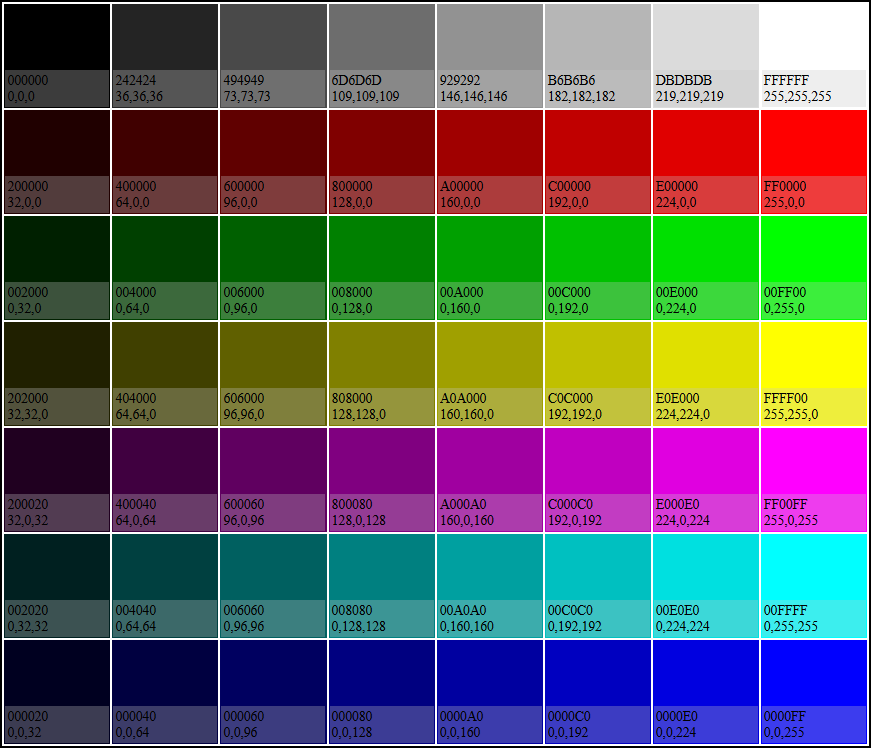
Along with the GIMP palette:
GIMP Palette
Name: LeeRGB
Colors: 56
#
  0	  0	  0	#000000
 36	 36	 36	#242424
 73	 73	 73	#494949
109	109	109	#6D6D6D
146	146	146	#929292
182	182	182	#B6B6B6
219	219	219	#DBDBDB
255	255	255	#FFFFFF
 32	  0	  0	#200000
 64	  0	  0	#400000
 96	  0	  0	#600000
128	  0	  0	#800000
160	  0	  0	#A00000
192	  0	  0	#C00000
224	  0	  0	#E00000
255	  0	  0	#FF0000
  0	 32	  0	#002000
  0	 64	  0	#004000
  0	 96	  0	#006000
  0	128	  0	#008000
  0	160	  0	#00A000
  0	192	  0	#00C000
  0	224	  0	#00E000
  0	255	  0	#00FF00
 32	 32	  0	#202000
 64	 64	  0	#404000
 96	 96	  0	#606000
128	128	  0	#808000
160	160	  0	#A0A000
192	192	  0	#C0C000
224	224	  0	#E0E000
255	255	  0	#FFFF00
 32	  0	 32	#200020
 64	  0	 64	#400040
 96	  0	 96	#600060
128	  0	128	#800080
160	  0	160	#A000A0
192	  0	192	#C000C0
224	  0	224	#E000E0
255	  0	255	#FF00FF
  0	 32	 32	#002020
  0	 64	 64	#004040
  0	 96	 96	#006060
  0	128	128	#008080
  0	160	160	#00A0A0
  0	192	192	#00C0C0
  0	224	224	#00E0E0
  0	255	255	#00FFFF
  0	  0	 32	#000020
  0	  0	 64	#000040
  0	  0	 96	#000060
  0	  0	128	#000080
  0	  0	160	#0000A0
  0	  0	192	#0000C0
  0	  0	224	#0000E0
  0	  0	255	#0000FF